Exercise 1: Explore alignment options
The primary goal of this lab is see the effect of the four primary layout options when applied to a view contained in a StackLayout. There is no code to write for this exercise.
To complete the exercise, you will need Visual Studio for Windows or macOS with the Xamarin development tools installed. You will also need either an emulator/simulator or a device to run the exercise on. Please see the setup page if you need help installing the Xamarin development environment.
Open the starter solution
Open the Alignment starter project from the Exercise 1 > Start folder in your copy of the cloned or downloaded course materials in either Visual Studio for Windows or Visual Studio for Mac.
Run the LayoutOptions app
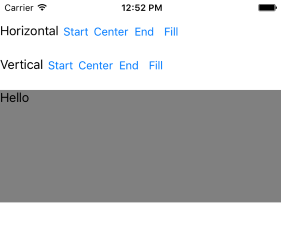
The provided app has eight buttons paired with three labels and the "Hello" label. Four buttons change the HorizontalOptions on the label and four buttons change the VerticalOptions. The "Hello" Label has a gray background so you can determine its size (see below).
At startup, the "Hello" Label will have the default alignment option of Fill for both horizontal and vertical. It also has a WidthRequest and HeightRequest of 150. Your goal is to run the app and see how the different layout options change the size and position of the "Hello" Label.
- Open the Alignment app.
- Run the app on a platform of your choice.
-
At startup, with the default alignment of
Fill, are theWidthRequestandHeightRequestsettings respected?
The "Hello" Label is in a vertical StackLayout so you should see that the WidthRequest is ignored while the HeightRequest is respected.
- Try each of the vertical layout options and observe the behavior. Is there any change? Why or why not?
You should not see any change to the "Hello" Label: the StackLayout is vertical so it is using the HeightRequest and completely ignoring the vertical options.
- Try each of the horizontal layout options and observe the behavior. Are these options respected by the layout engine?
You should see both the alignment and the size update. With Fill, the "Hello" Label will occupy the full width of the StackLayout so the alignment is irrelevant since it completely fills the horizontal space. With Start, Center, and End, the WidthRequest will be respected and the alignment will also change since the Label no longer occupies the full width of the StackLayout.
Exercise summary
There are a few interesting points to take away from this exercise. First, notice that the alignment options (Start, Center, End, and Fill) can change both the size and the alignment of a view. Second, the container can overrule the view's settings; for example, the vertical StackLayout completely ignores the VerticalOptions of the Label. Third, the behavior might be different if we used a different layout such as a Grid.